Burning Bridges AI Video Generator

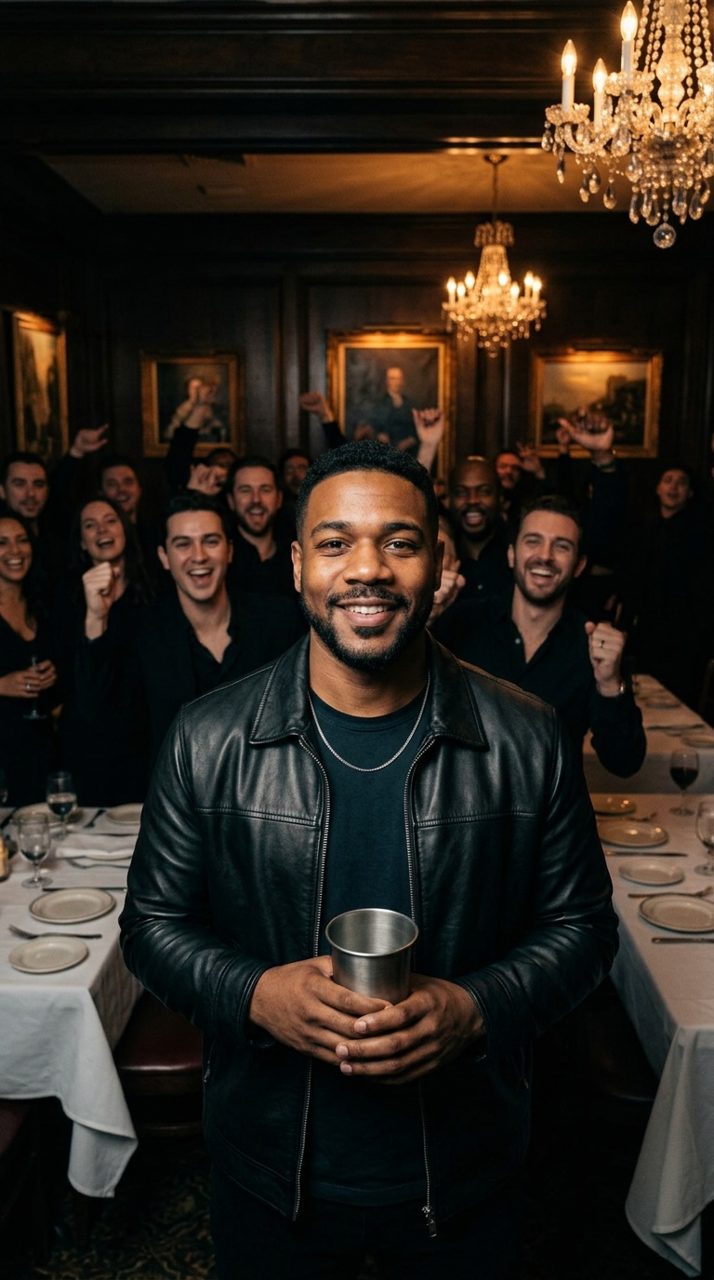
Host the chandelier-lit party from the trend, or let your pet host it. Add one photo and get a new video with the guests celebrating around the host.

1 photo · pets too · 12 sec · 9:16 · no sound · 10 credits1 photo · pets too · 12 sec · 9:16 · no sound

Photos that work

  • One person or pet in each photo
  • Face the camera, whole face in view
  • Bright light, no sunglasses

We delete your photos within 24 hours.

AI-generated example
Uploading0%
Can't use this photo

Add a photo to start.

Log in to make your video

Your photos stay here while you log in.

Use 10 credits?

If the video fails, the 10 credits come back on their own.

You need 10 credits

Credit pack

Checkout by Waffo Pancake. Your photos stay here.

We delete your photos within 24 hours.

Burning Bridges examples

StarTurn made these examples with AI-generated people and pets.

How to make a Burning Bridges AI video

  1. Add a photo of yourself or your pet. One person or pet in the photo.
  2. Wait a few seconds while we check the photo.
  3. Check the box to confirm that everyone in the photo is 18 or older and agreed to be in the video.
  4. Tap Do the trend. Making the video takes about 5 minutes, and you can leave the page while it works.Click Do the trend. Making the video takes about 5 minutes, and you can leave the page while it works.
  5. Save the video to your phone, open TikTok and add the Drake Burning Bridges sound before you post.Download the video, open TikTok and add the Drake Burning Bridges sound before you post.

Photos that work best

  • Face the camera with your whole face in view.
  • Use bright, even light from the front.
  • No sunglasses, masks or hands over the face.
  • Waist up works better than a tight close-up.
  • One person or pet per photo. Crop out anyone else.
  • JPG, PNG or WebP, up to 10 MB.

Who you can put in it

You, a friend, a partner or your pet. Everyone in the photos has to be 18 or older and OK with being in the video, so ask your friend before you use their photo.

We don't accept photos of children, celebrities or other public figures. Every photo is checked before we make the video.

What you get

Length
12 seconds
Format
9:16 vertical MP4
Video model
Kling 3.0 Standard
Sound
None. Add the trend's sound in TikTok.
Cost
10 credits
Kept for
30 days, then deleted
Your photos
Deleted within 24 hours

About the Burning Bridges trend

The trend comes from the music video for Drake’s “Burning Bridges,” a song from his album Iceman. The video went up on YouTube on May 15, 2026. In it, Drake hosts a crowded private dinner in a room with crystal chandeliers, dark wood walls and white tablecloths. He holds a silver cup, waves and points at the camera while guests gather around him.

AI versions that put someone new in the host’s spot started spreading on TikTok in early October 2026. By October 14, the #burningbridgesai tag had about 2,700 videos and 9.2 million views. In our version, you or your pet take the host’s place at a new party with chandeliers and cheering guests. The moves are new, so they won’t follow the original video or the lyrics. We aren’t affiliated with Drake, OVO or Republic Records.

StarTurn makes a new scene from your photos. It doesn't use the original video or its song.

Sources: YouTube, Wikipedia, Songfacts, TikTok (#burningbridgesai), TikTok (@ninersshowyo).

Burning Bridges AI questions

Does it include the song?

No. The video has no sound. When you post on TikTok, tap Add sound and pick the Drake Burning Bridges sound to join the trend.

Does it use the original video?

No. We don't use the original clip or its footage. The scene and the movement are made new by AI from your photo.

Which AI model makes the video?

Kling 3.0 Standard, a video model by Kling AI. First, Nano Banana 2 by Google puts your photo into the scene as a still image, and Kling 3.0 Standard turns that image into the video. We use both models through fal.ai and aren't affiliated with Kling AI or Google.

Can I use my pet?

Yes. Add a photo of your pet instead, with its face clearly visible.

How long does it take?

About 5 minutes. You can close the page; the video waits for you in My videos.

How much does it cost?

10 credits per video. Credit packs start at $5. If a video fails, the 10 credits go back to your balance on their own.

What happens to my photos?

We use them only to make your video and delete them within 24 hours. The video stays in My videos for 30 days so you can download it, then it's deleted.

Can I post it on TikTok?

Yes, from your own account. TikTok asks creators to label realistic AI videos, so turn on its AI-generated content label when you post.

Can I use a photo of a celebrity?

No. Photos of celebrities, other public figures and children aren't allowed. Use photos of yourself and people who agreed to be in the video.

Can I add a friend?

No. This template takes one photo, of you or your pet as the host. The party guests are made by AI.

Will the lips match the song?

No. The video is made without sound, so the lips and moves don't follow the lyrics when you add the song in TikTok.